


Escopo de Aplicação
Este guia se aplica ao Gate App
Antes de começar: Certifique-se de que o Gate App está instalado e você está logado
Tempo estimado: 2 min
Objetivo
Este guia irá mostrar como personalizar as configurações e notificações do seu Gate App.
Passos
Passo 1: Acesse o Centro do Usuário
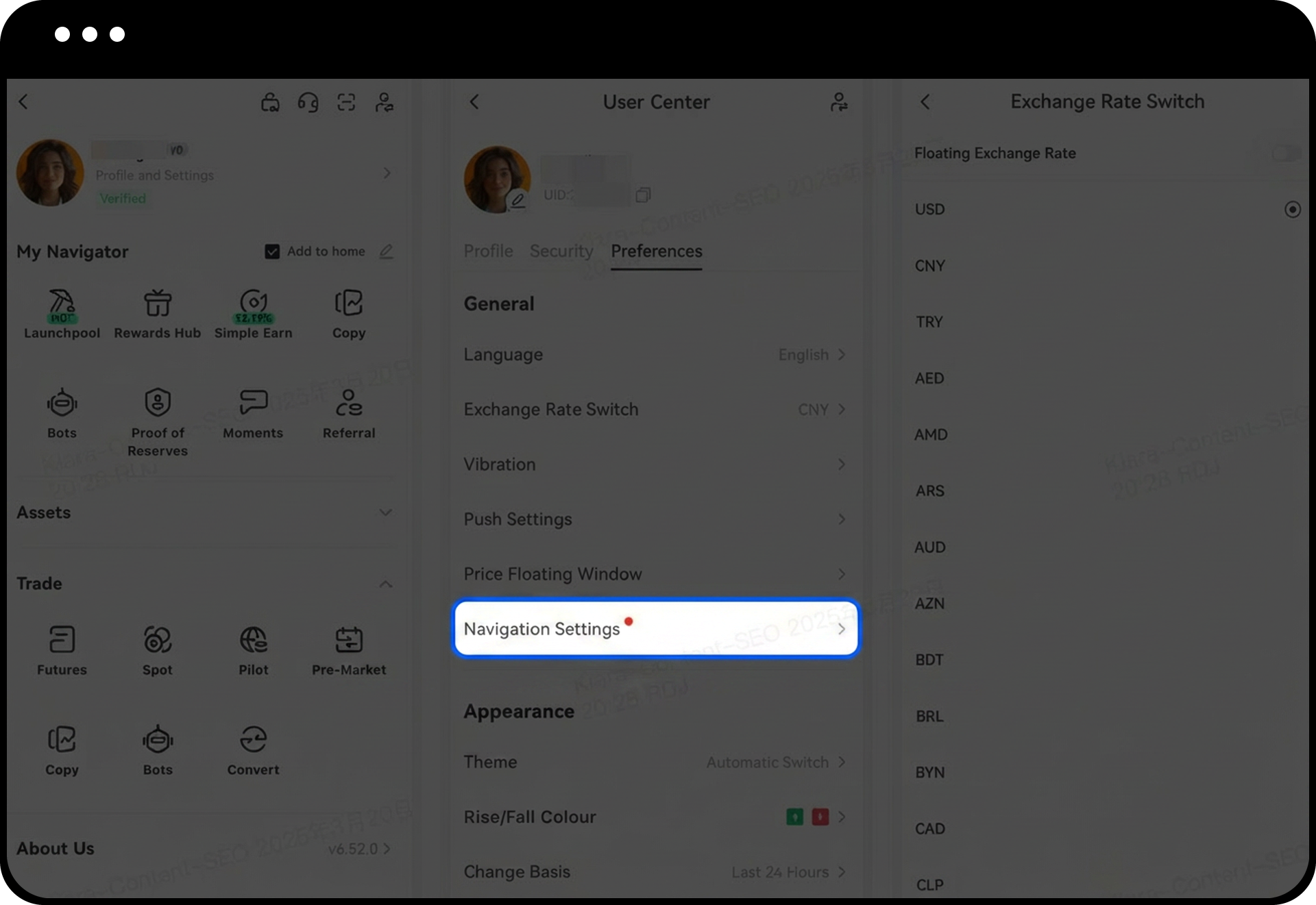
Faça login no Gate App, vá para a página inicial e toque no ícone do avatar localizado no canto superior esquerdo para acessar o Centro do Usuário.
Passo 2: Entre no Menu de Preferências
Toque em "Preferências" no menu do Centro do Usuário para visualizar todas as opções de personalização disponíveis.
Passo 3: Personalize as Configurações Gerais
Dentro da seção de Preferências, configure as seguintes opções gerais:
- Preferências de idioma
- Exibição da moeda de cotação
- Preferências de notificações push
- Configurações de janela pop-up de alerta de preço
Passo 4: Modifique as Opções de Aparência
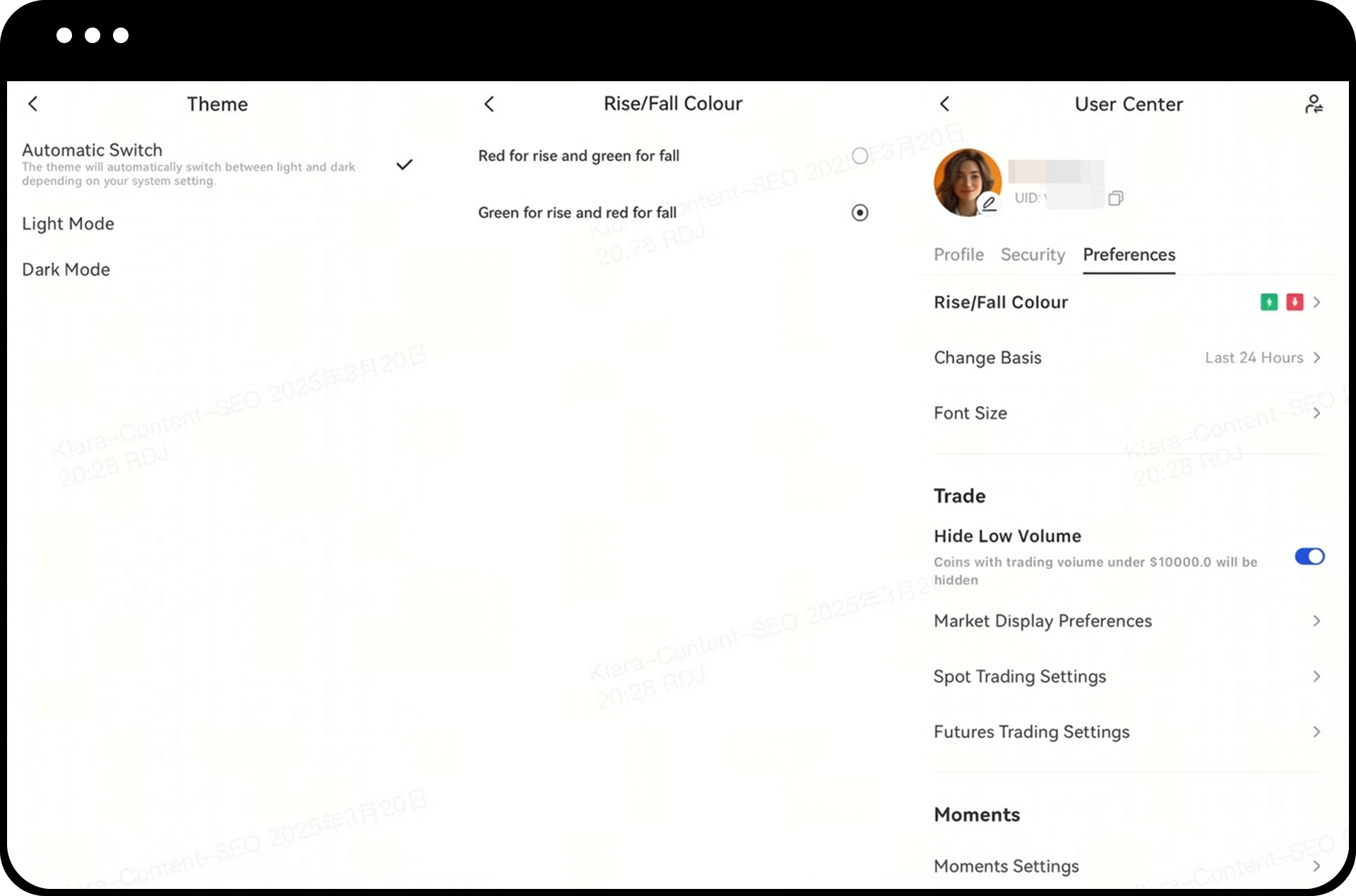
Acesse as configurações de aparência para personalizar:
- Tema do app (modo claro ou escuro)
- Esquema de cores para altas e baixas de preço
- Horário de referência para cálculo das variações de preço
- Tamanho da fonte exibida
Observações
- Todas as alterações de personalização são aplicadas imediatamente após a confirmação.
- A Gate reserva-se o direito de atualizar as funcionalidades, interfaces e configurações disponíveis do produto a qualquer momento.
- A negociação de ativos digitais envolve riscos significativos e os preços podem apresentar grande volatilidade.
- As informações fornecidas são apenas para fins educacionais e não constituem aconselhamento de investimento.
- Para informações detalhadas sobre riscos, consulte a Divulgação de Riscos e o Contrato do Usuário da Gate.
FAQ
P1: Minhas configurações são sincronizadas entre vários dispositivos?
R: Sim, suas preferências estão associadas à sua conta Gate e serão sincronizadas ao fazer login em diferentes dispositivos usando a mesma conta.
P2: Como posso restaurar as configurações padrão?
R: Você pode alterar manualmente cada configuração para seu valor padrão através do menu Preferências. Atualmente, não há uma opção para redefinir todas as configurações de uma só vez.
P3: O que devo fazer se as notificações push não estiverem funcionando?
R: Primeiro, verifique se as notificações push estão ativadas nas preferências do App. Em seguida, confira as configurações do sistema do seu dispositivo para garantir que o Gate App tem permissão para enviar notificações e que o modo Não Perturbe está desativado.
Isenção de responsabilidade
O conteúdo aqui fornecido é apenas para fins de referência e educacionais e não constitui qualquer conselho financeiro, de investimento, de negociação ou jurídico, nem constitui uma oferta ou solicitação para comprar ou vender quaisquer ativos digitais. A Gate não faz representações ou garantias expressas ou implícitas em relação à precisão, integridade ou atualidade das informações aqui contidas. Recursos, interfaces, regras e estruturas de taxas dos produtos podem ser atualizados ou ajustados a qualquer momento. Consulte os anúncios mais recentes e as informações reais exibidas na plataforma Gate para obter os detalhes mais precisos.
Os investimentos em ativos digitais envolvem riscos significativos e os preços podem flutuar substancialmente. Você pode perder o valor total do seu investimento. Tome decisões com cautela, com base em sua própria situação financeira e tolerância ao risco, após compreender totalmente os riscos associados. Se necessário, recomenda-se consultar um consultor financeiro ou jurídico profissional independente.
Para mais informações sobre possíveis riscos, consulte a Divulgação de Riscos e o Termo de Acordo do Usuário da Gate.
