 Trusted Editorial content, reviewed by leading industry experts and seasoned editors. Ad Disclosure
On July 24, Ledger launched the Recovery Key, a Secure Element-protected card that can restore access to your Ledger wallet and private keys.
Trusted Editorial content, reviewed by leading industry experts and seasoned editors. Ad Disclosure
On July 24, Ledger launched the Recovery Key, a Secure Element-protected card that can restore access to your Ledger wallet and private keys.
And it’s everything HODLers around the world have been waiting for—a solution to the burden of the 24-word Secret Recovery Phrase (SRP).
The anxiety is now gone. Self-custody is made elementary. And it’s free if you buy a Ledger Flex or Stax.The card is NFC-based, PIN-protected, and completely offline. Plus, any and all interactions with it happen through your Stax’s or Flex’s Secure Screen, which ensures what you see is what you sign.
Why Is Ledger’s Recovery Key a Game-Changer for Crypto Users?
Ledger’s Recovery Key offers several key advantages:
- One-tap backup and key restoration through encrypted NFC
- Permanently offline backup storage in a compact form
- Top-tier backup security through the Secure Element chip
- Peace of mind about losing or misplacing your recovery phrase paper
Picture this – you can restore your crypto accounts to any NFC-enabled Ledger with just a card tap and a PIN code. A few seconds worth of work for unmatched peace of mind and ease of use? Sign me up!
Self-custody has never been easier, and if you were worrying about the old Ledger Recover subscription, then the new Recovery Key fills that gap perfectly.It’s offline, always under your control, and it’s very hard to mess it up.
Remember, though, the Recovery Key is not a replacement for your SRP. It’s a spare backup in case you lose your recovery sheet.
This means your Ledger Wallet doesn’t suddenly become seedless. Your seed phrase still exists, and you control it at all times. As you well should.
How Does the Ledger Recovery Key Work?
The Recovery Key card only works with NFC-enabled Ledger wallets like the Flex and Stax. So, your Nano S or X? Incompatible, unfortunately.
Here’s what the initial set-up process looks like on a Ledger Flex:
1. Enable NFC on Your Wallet
The Recovery Key card requires NFC to work, so first you need to enable NFC in your Flex or Stax device. You can find the NFC option in your device’s settings. Tap to enable it.
2. Select the New ‘Ledger Recovery Key’ Option in the Settings
In your Ledger settings, find the ‘Ledger Recovery Key’ option and tap it.
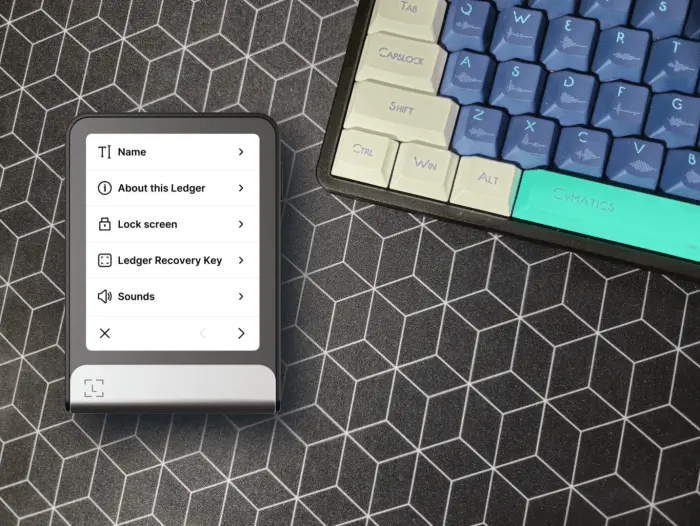
3. Hold the Recovery Key Card Against the Back of Your Device
Now take your Recovery Key card and hold it against your Ledger device. A loading bar will appear. Your device will recognize the card and ask you to start the setup.
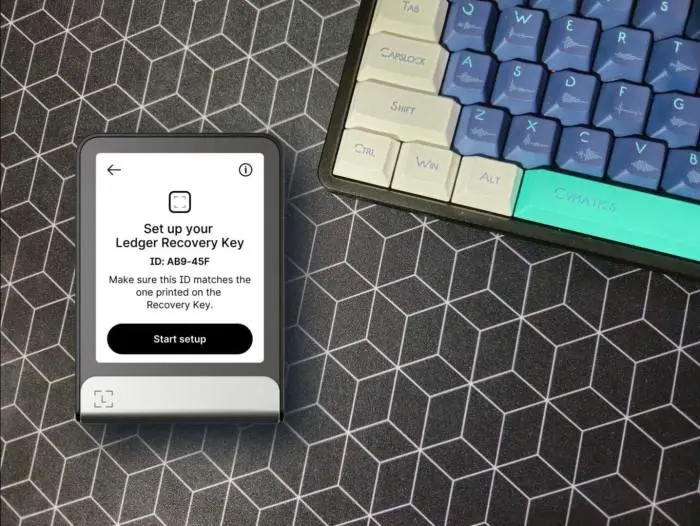
Enter your wallet’s PIN code, read the on-screen instructions, and create a new 4–8 digit PIN for the Recovery Key (this is different from your device PIN).
Confirm the PIN code, hold the card against your device again, and wait until the loading bar fills up.
And you’re done – you just made a completely offline backup of your Ledger’s Secret Recovery Phrase. To recover your wallet keys, select ‘Restore access to assets’ on a new device, tap your Recovery Key card, enter the PIN, and wait until the recovery process ends.
Get the Ledger Recovery Key for Free on Stax & Flex Purchases
The Recovery Key comes for free with a Stax or Flex purchase. But what about those of you who, like me, bought their device before this? Well, we can buy the Recovery Key for $39 on the official site.
Or… get it for free (discounted shipping fees included) through Ledger’s campaign that runs until August 30! That’s right, Ledger is rewarding previous supporters by giving away the new backup for free. You’ll have to connect your Stax or Flex to the platform to prove you bought one, of course.
Overall, with crypto scams reaching all-time highs in 2024 because of AI, it’s no longer acceptable to keep your crypto in online wallets or on exchanges.Ledger offers one of the best cold wallets around, and the new offline Recovery Key makes even security paranoids like me grin from ear to ear.
Go get your Recovery Key for ultimate peace of mind and remember, always verify, never trust!
![]() Editorial Process for bitcoinist is centered on delivering thoroughly researched, accurate, and unbiased content. We uphold strict sourcing standards, and each page undergoes diligent review by our team of top technology experts and seasoned editors. This process ensures the integrity, relevance, and value of our content for our readers.
Editorial Process for bitcoinist is centered on delivering thoroughly researched, accurate, and unbiased content. We uphold strict sourcing standards, and each page undergoes diligent review by our team of top technology experts and seasoned editors. This process ensures the integrity, relevance, and value of our content for our readers.
Disclaimer: The information on this page may come from third parties and does not represent the views or opinions of Gate. The content displayed on this page is for reference only and does not constitute any financial, investment, or legal advice. Gate does not guarantee the accuracy or completeness of the information and shall not be liable for any losses arising from the use of this information. Virtual asset investments carry high risks and are subject to significant price volatility. You may lose all of your invested principal. Please fully understand the relevant risks and make prudent decisions based on your own financial situation and risk tolerance. For details, please refer to
Disclaimer.


